Shopify app · Promotions
Nine promotion types.
Shopify does the math.
NionWeb Discount writes your offer into Shopify's own discount engine. The price a shopper sees in the cart is the price Shopify charges at checkout — no proxy in the middle, no theme script rewriting totals.
- Nine promotion types
- Three storefront components
- No customer data stored
Two promotions on one cart: the mug offer takes the cheapest of the three units off, and the order clears the free-shipping threshold. Both are produced by a Shopify Function inside your store, so they survive every checkout path.
The nine
Each promotion is one type plus its conditions. Amounts below are examples in USD; promotions run in your store's own currency.
- Buy X, pay Y
- Buy 3, pay for 2. The free units are always the cheapest ones.
- Tiered percentage
- 5+ items 10% off, 10+ items 20% off. The tier that is reached applies to every item.
- Fixed unit price
- Buy 10 or more at $80.00 each. The difference comes off automatically.
- Cheapest or most expensive
- Buy 5 or more products and the cheapest one is free.
- Every Nth item
- Every 3rd item 50% off, counted from the cheapest units.
- Order threshold
- 5% off over $1,000, 10% off over $2,000, applied to the order total.
- Spend step
- $25 off for every $500 spent, as many times as the cart allows.
- Free shipping threshold
- Free shipping over $750, applied to the shipping line at checkout.
- Free gift
- A free mug over $1,000, added to the cart and discounted to zero.
Inside the app
One list, every promotion
Type, tiers, what it applies to, status and dates on one row. Turn a promotion off without deleting it, or open it to change a tier.
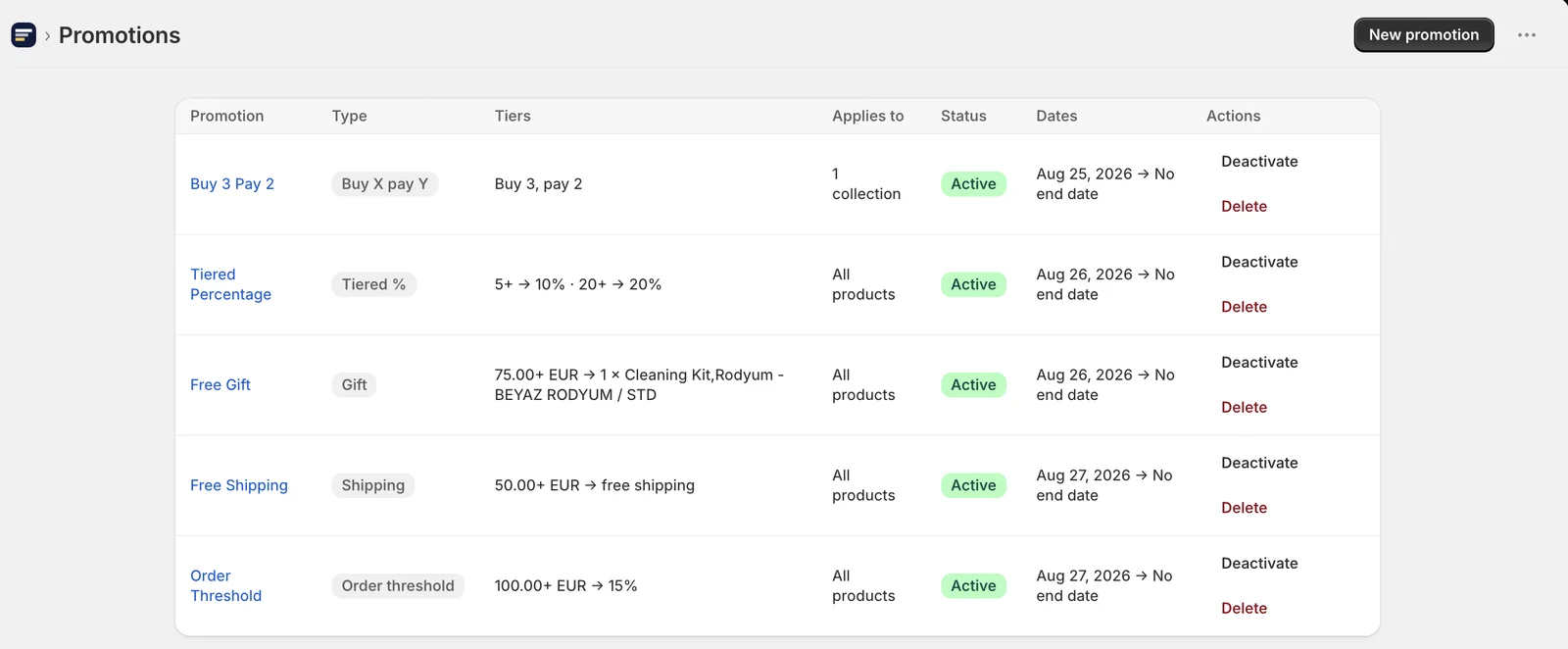
A real screen from the app, running in a Shopify admin.
On the storefront
Three optional components you switch on from the theme editor. None of them are required for a promotion to apply.
Promo offer
Shows the tiers of a running promotion on the product page, so the shopper sees the offer before the cart.
Promo bar
Follows the live cart toward the next goal — one more item, or a little more spend — and updates as the cart changes.
Free gift auto-add
Adds the qualifying gift to the cart on its own, and removes it again if the cart drops back below the threshold.
Who gets it, and when
Run a promotion on the whole catalogue, on a hand-picked set of products, or on a collection.
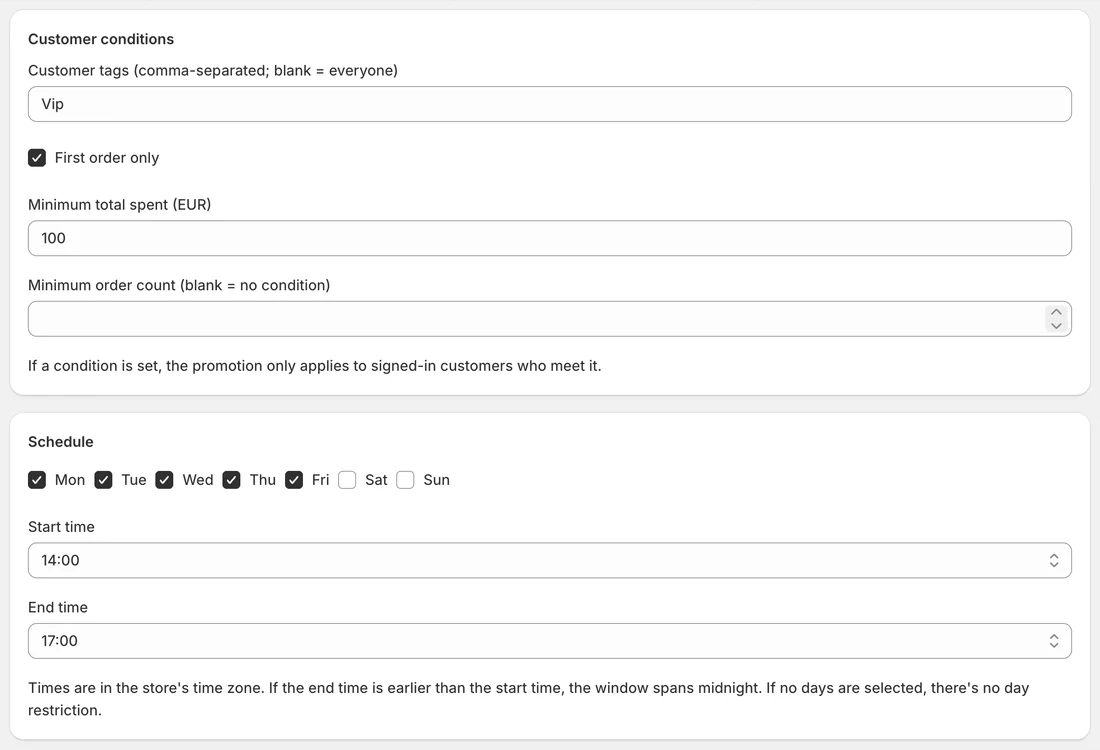
Limit it to customer tags, to first orders only, or to customers above an amount spent or order count.
Pick the weekdays a promotion runs on and a daily time window, on top of the usual start and end dates.
Apply automatically, or behind a discount code with a usage limit and a once-per-customer rule.
Decide per promotion whether it can combine with your other product, order and shipping discounts.
Questions
Will this slow my storefront down?
The discount itself costs your theme nothing — it is calculated by Shopify at checkout. The three storefront components are optional, load no third-party scripts and make no requests to us.
Does it work with my theme?
The components are a theme block and two app embeds, so any Online Store 2.0 theme can use them from Customize. Promotions work on every theme, embeds or not.
Can a promotion run alongside my other discounts?
Yes. Each promotion carries its own combination settings for product, order and shipping discounts, the same ones Shopify uses natively.
What happens if I uninstall?
The discounts created by the app stop applying, and the session stored for your shop is deleted. Nothing is left behind on your storefront.
What do you store about my shoppers?
Nothing. Promotion settings live as metafields on the discounts inside your own store, and customer eligibility is evaluated by Shopify at checkout. The privacy policy spells out every field.
How much is it?
A free trial, then a single monthly plan billed through Shopify. The current price is shown on the app's Shopify App Store page and in your admin before you subscribe.